
Chrome.runtime API 解析
运行时
一、各模块 chrome.runtime API 内容
1. Service worker 中 runtime 内容
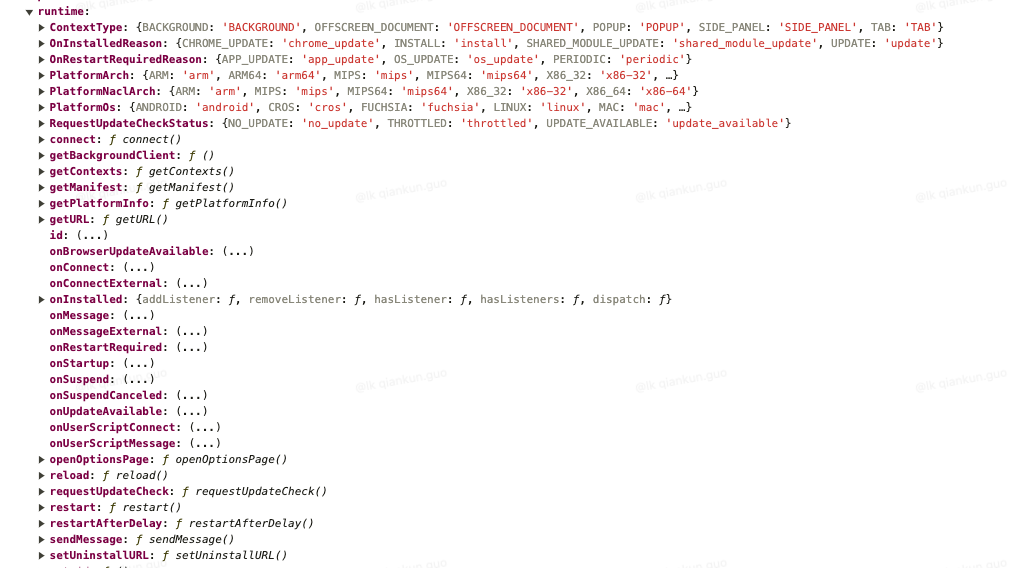
2. Action 中 runtime 内容
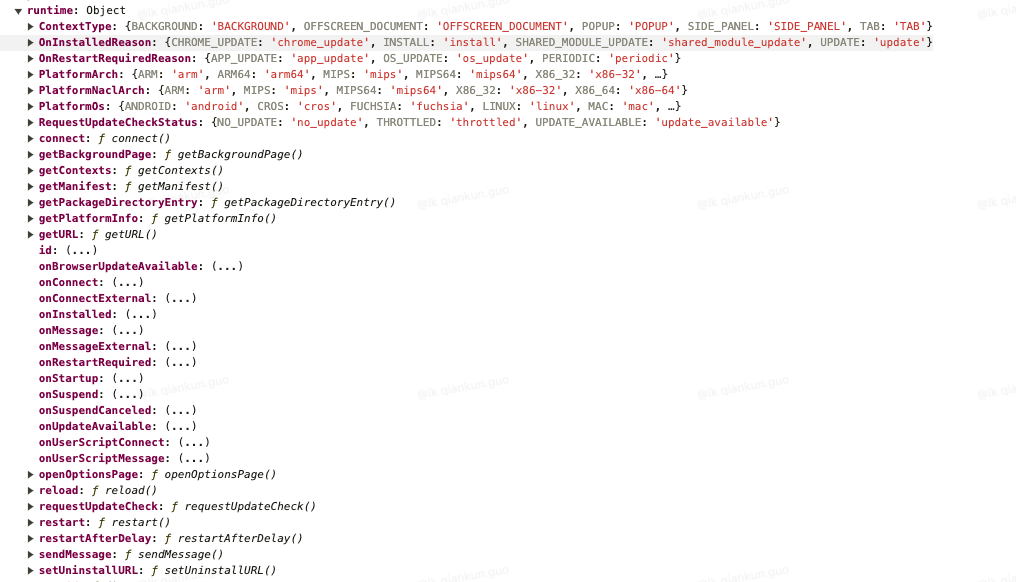
3. Content 中 runtime 内容
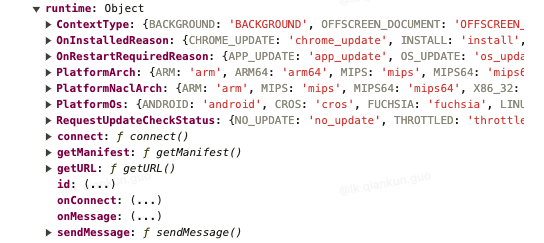
二、权限
Chrome runtime API 上的大多数方法都不需要任何权限 但是 sendNativeMessage() 和 connectNative() 除外,它们需要 nativeMessaging 权限。
{
  "permissions": [
    "nativeMessaging"
  ],
}三、功能
- 使用
chrome.runtime API检索Service Worker,返回有关manifest.json的详细信息 - 监听和响应应用或插件生命周期中的事件
- 还可以使用此 API 将网址的相对路径转换为完整的一个 URL
- ...
四、Runtime API 用法
1. 消息传递
可以使用以下方法和事件与插件中的不同上下文以及其他插件进行通信:
connect()onConnectonConnectExternalsendMessage()onMessageonMessageExternal
插件还可以使用 connectNative() 和 sendNativeMessage() 将消息传递给用户设备上的原生应用。
1.1. Content-scripts.js 文件发送和接收消息
(async () => {
  // 使用 sendMessage 从 Content 发送消息
  const response = await chrome.runtime.sendMessage({greeting: "hello"});
  console.log(response);

  // 使用 onMessage.addListener Content 接收消息
  chrome.runtime.onMessage.addListener(function(request, sender, sendResponse) {
    console.log(sender.tab ? "from a content script:" + sender.tab.url : "from the extension");
    if (request.greeting === "hello") sendResponse({farewell: "goodbye"});
  });


  // 使用 connect 从 Content 发送和接收消息
  var port = chrome.runtime.connect({name: "knockknock"});
  port.postMessage({joke: "Knock knock"});
  port.onMessage.addListener(function(msg) {
    if (msg.question === "Who's there?")
      port.postMessage({answer: "Madame"});
    else if (msg.question === "Madame who?")
      port.postMessage({answer: "Madame... Bovary"});
  });
})();1.2. service-worker.js 文件发送和接收消息
(async () => {
  // 使用 sendMessage 从 background/service-worker 发送消息
  const [tab] = await chrome.tabs.query({active: true, lastFocusedWindow: true});
  const response = await chrome.tabs.sendMessage(tab.id, {greeting: "hello"});
  console.log(response);

  // 使用 onMessage.addListener background/service-worker 接收消息
  chrome.runtime.onMessage.addListener(function(request, sender, sendResponse) {
    console.log(sender.tab ? "from a content script:" + sender.tab.url : "from the extension");
    if (request.greeting === "hello") sendResponse({farewell: "goodbye"});
  });


  // 使用 onConnect background/service-worker 接收消息和发送
  chrome.runtime.onConnect.addListener(function(port) {
    console.assert(port.name === "knockknock");
    port.onMessage.addListener(function(msg) {
      if (msg.joke === "Knock knock")
        port.postMessage({question: "Who's there?"});
      else if (msg.answer === "Madame")
        port.postMessage({question: "Madame who?"});
      else if (msg.answer === "Madame... Bovary")
        port.postMessage({question: "I don't get it."});
    });
  });
})();2. 访问拓展程序和平台元数据
getManifest()getPlatformInfo()
3. 管理拓展程序生命周期
onInstalledonStartupopenOptionsPage()reload()requestUpdateCheck()setUninstallURL()
4. 实用功能
getURL()restart()restartAfterDelay()
五、Chrome.runtime API 类型(Types)
1. ContextFilter: object
- 用于匹配特定插件上下文的过滤器。
- 匹配的上下文必须与所有指定的过滤条件匹配;任何未指定的过滤条件均匹配所有可用的上下文。因此,“{}”的过滤器将匹配所有可用上下文。
1.1. 属性
- contextIds:
string[] 可选此上下文的唯一标识符 - contextTypes:
ContextType[] 可选对应的上下文类型。 - documentIds:
string[] 可选 与此上下文关联的文档的UUID - documentOrigins:
string[] 可选 与此上下文关联的文档的来源 - documentUrls:
string[] 可选 与此上下文关联的文档的网址 - frameIds:
number[] 可选 此上下文的帧ID - incognito:
boolean可选 上下文是否与无痕模式个人资料相关联。 - tabIds:
number[] 可选 此上下文的标签页ID - windowIds:
number[] 可选 此上下文的窗口ID
2. ContextType: 枚举
2.1. 枚举值
TAB: 以标签页形式指定上下文类型POPUP: 将上下文类型指定为插件弹出式窗口BACKGROUND: 将上下文类型指定为Service Worker。OFFSCREEN_DOCUMENT: 将上下文类型指定为屏幕外文档。SIDE_PANEL: 以侧边栏形式指定上下文类型。
3. ExtensionContext:object
- 上下文托管插件内容
3.1. 属性
- contextId:
string此上下文的唯一标识符 - contextType:
ContextType对应的上下文类型 - documentId: string 可选 与此上下文关联的文档的
UUID - documentOrigin:
string可选 与此上下文关联的文档的来源 - documentUrl:
string可选 与此上下文关联的文档的网址 - frameId:
number此上下文的帧 ID,如果该上下文未托管在帧中,则为 -1 - incognito:
boolean上下文是否与无痕模式个人资料相关联 - tabId:
number此上下文的标签页 ID,如果该上下文未托管在标签页中,则为 -1 - windowId:
number此上下文的窗口 ID,如果此上下文未托管在窗口中,则为 -1
4. MessageSender:object
- 一个对象,其中包含有关发送消息或请求的脚本上下文的信息。
4.1. 属性
- documentId:
string可选 打开连接的文档的UUID。 - documentLifecycle:
string可选 打开连接的文档在端口创建时所处的生命周期 - frameId:
number可选 打开连接的帧,0 表示顶级帧,正值表示子帧 - id:
string可选 打开连接的插件或应用的ID。 - nativeApplication:
string可选 打开连接的原生应用的名称。 - origin:
string可选 打开连接的网页或框架的来源 - tab:
Tab可选 打开连接的tabs.Tab - tlsChannelId:
string可选 打开连接的页面或框架的TLS通道ID - url:
string可选 打开连接的网页或框架的网址
5. OnInstalledReason: 枚举
- 分派此事件的原因。
5.1. 枚举值
install: 将事件原因指定为安装。update: 以插件更新的形式指定事件原因。chrome_update: 将事件原因指定为 Chrome 更新。shared_module_update: 将事件原因指定为共享模块的更新。
6. OnRestartRequiredReason: 枚举
- 分派事件的原因
6.1. 枚举值
app_update: 将事件原因指定为应用更新。os_update: 将事件原因指定为操作系统更新。periodic: 将事件原因指定为应用定期重启。
7. PlatformArch: 枚举
- 机器的处理器架构。
7.1. 枚举值
arm: 将处理器架构指定为armarm64: 将处理器架构指定为arm64x86-32: 将处理器架构指定为x86-32x86-64: 将处理器架构指定为x86-64mips: 以mips形式指定处理器架构mips64: 以mips64形式指定处理器架构
8. PlatformInfo: object
- 包含当前平台相关信息的对象。
8.1. 属性
- arch:
PlatformArch机器的处理器架构。 - nacl_arch:
PlatformNaclArch原生客户端架构 - os:
PlatformOs运行Chrome的操作系统。
9. PlatformNaclArch: 枚举
- 原生客户端架构
9.1. 枚举值
arm: 将原生客户端架构指定为armx86-32: 将原生客户端架构指定为x86-32x86-64: 将原生客户端架构指定为x86-64mips: 以mips形式指定原生客户端架构mips64: 以mips64形式指定原生客户端架构
10. PlatformOs:枚举
- 运行
Chrome的操作系统。
10.1. 枚举值
mac: 指定MacOS操作系统。win: 指定了Windows操作系统。android: 用于指定Android操作系统。cros: 指定Chrome操作系统。linux: 用于指定Linux操作系统。openbsd: 指定OpenBSD操作系统。fuchsia: 用于指定Fuchsia操作系统。
11. Port
- 允许与其他网页进行双向通信的对象
11.1. 属性
- name:
string端口的名称,在对runtime.connect的调用中指定 - onDisconnect:
Event\<function void \>在端口与另一端断开连接时触发。 - onMessage:
Event\<function void\>端口的另一端调用postMessage时会触发此事件 - sender:
MessageSender可选 此属性将仅出现在传递到onConnect/onConnectExternal/onConnectNative监听器的端口上。 - disconnect:
void立即断开该端口的连接 - postMessage:
void向端口的另一端发送消息。如果端口断开连接,则会抛出错误
12. RequestUpdateCheckStatus: 枚举
- 更新检查的结果
12.1. 枚举值
throttled: 指定状态检查已受到限制。如果在短时间内反复检查,就可能会发生这种情况no_update: 指定没有可安装的更新。update_available: 指明有要安装的可用更新。
六、Chrome.runtime API 属性(Properties)
4.1. id
string插件/应用的 ID。
4.2. lastError
Object如果API函数调用失败,则填充错误消息,否则将填充未定义状态message:string可选 所发生的错误的详细信息
七、Chrome.runtime API 方法(Methods)
1. connect()
尝试连接插件/应用(例如后台网页)或其他插件/应用中的监听器
chrome.runtime.connect(
  extensionId?: string,
  connectInfo?: object,
)1.1. 参数
- extensionId:
string可选 要连接的插件或应用的ID - connectInfo:
object可选- includeTlsChannelId:
boolean可选 对于正在监听连接事件的进程,是否将TLS通道ID传递到onConnectExternal - name:
string可选 对于正在监听连接事件的进程,此参数将传递到onConnect
- includeTlsChannelId:
1.2. 返回
Port可以发送和接收消息的端口
2. connectNative()
连接到主机中的原生应用
chrome.runtime.connectNative(
  application: string,
)2.1. 参数
- application:
string要连接的已注册应用的名称。
2.2. 返回
Port可通过应用发送和接收消息的端口
3. getBackgroundPage()
检索当前插件/应用中运行的后台网页的
JavaScript“window”对象
仅限 Popup 页面使用
chrome.runtime.getBackgroundPage(
  callback?: function,
)3.1. 参数
- callback 可选
callback参数如下所示:
(backgroundPage?: Window)=>void- backgroundPage:
Window可选 背景网页的JavaScript“window”对象。
3.2. 返回
- Promise<Window|undefined>
4. getContexts()
提取与此插件相关联的有效上下文的相关信息
chrome.runtime.getContexts(
  filter: ContextFilter,
  callback?: function,
)4.1. 参数
- filter:
ContextFilter用于查找匹配上下文的过滤条件 - callback: function 可选: (contexts: ExtensionContext[])=>void
- contexts:
ExtensionContext[] 匹配的上下文
- contexts:
4.2. 返回
- Promise<ExtensionContext[]>
5. getManifest()
从清单中返回有关应用或插件的详细信息,返回的对象是完整清单文件的序列化内容。
chrome.runtime.getManifest()5.1 返回
- object:
manifest详情
6. getPackageDirectoryEntry()
返回软件包目录的 DirectoryEntry。
只能在 popup 页面调用
chrome.runtime.getPackageDirectoryEntry(
  callback?: function,
)6.1. 参数
- callback:function 可选callback 参数如下所示:(directoryEntry:DirectoryEntry)=>void
- directoryEntry:DirectoryEntry
6.2. 返回
- Promise<DirectoryEntry>
7. getPlatformInfo()
返回有关当前平台的信息。
chrome.runtime.getPlatformInfo(
  callback?: function,
)7.1. 参数
- callback:function 可选 (platformInfo:PlatformInfo)=>void
- platformInfo:
PlatformInfo
- platformInfo:
7.2. 返回
- Promise<PlatformInfo>
8. getURL()
根据路径获取对应的网址 URL
chrome.runtime.getURL(path:string)8.1. 参数
- path:
string应用/插件中资源的路径,以相对于其安装目录表示。
8.2. 返回
string对应的网址URL
9. openOptionsPage()
打开插件的选项页面
chrome.runtime.openOptionsPage(callback?:function)9.1. 参数
- callback: function 可选()=>void
9.2. 返回
- Promise<void>
10. reload()
重新加载应用或插件。
chrome.runtime.reload()11. requestUpdateCheck()
对此应用程序/插件进行立即更新检查。
chrome.runtime.requestUpdateCheck(callback?:function)11.1. 参数
- callback: function 可选 (result:object)=>void
- result: object
- status: RequestUpdateCheckStatus 更新检查的结果。
- version: string 可选 如果有可用更新,则此字段包含可用更新的版本。
- result: object
11.2. 返回
- Promise<object>
12. restart()
当应用在自助服务终端模式下运行时,重启
ChromeOS设备
chrome.runtime.restart()13. restartAfterDelay()
当应用在自助服务终端模式下运行时,在特定秒数后重启
ChromeOS设备
chrome.runtime.restartAfterDelay(seconds:number,callback?:function)13.1. 参数
- seconds: number 重新启动设备前的等待时间(以秒为单位),如果选择 -1,则可以取消预定的重新启动。
- callback: function 可选 ()=>void
13.2. 返回
- Promise<void>
14. sendMessage()
向插件/应用或其他插件/应用中的事件监听器发送一条消息
chrome.runtime.sendMessage(
  extensionId?: string,
  message: any,
  options?: object,
  callback?: function,
)14.1. 参数
- extensionId:
string可选 要向其发送消息的插件/应用的 ID。如果省略此选项,消息将会发送到自己的插件/应用。如果从网页发送消息以实现网络消息,则必须使用此标签。 - message: any 要发送的消息
- options:
object可选- includeTlsChannelId:
boolean可选 对于正在监听连接事件的进程,是否将 TLS 通道 ID 传递到onMessageExternal
- includeTlsChannelId:
- callback: function 可选 (response:any)=>void
- response:
any消息的处理程序发送的JSON响应对象
- response:
14.2. 返回
- Promise<any>
15. sendNativeMessage()
向原生应用发送单条消息。
chrome.runtime.sendNativeMessage(
  application: string,
  message: object,
  callback?: function,
)15.1. 参数
- application: string 原生消息传递主机的名称。
- message: object 将传递给原生消息传递主机的消息。
- callback: function 可选 (response:any)=>void
15.2. 返回
- Promise<any>
16. setUninstallURL()
设置卸载后要访问的网址
chrome.runtime.setUninstallURL(
  url:string,
  callback?:function,
)16.1. 参数
- url: string 要在卸载插件后打开的网址
- callback: function(可选)()=>void
16.2. 返回
- Promise<void>
八、Chrome.runtime API 事件(Events)
从插件进程或内容脚本,通过 runtime.connect 建立连接时触发。
1. onConnect
chrome.runtime.onConnect.addListener(
  callback:function,
)1.1. 参数
- callback:function: (port:Port)=>void
2. onConnectExternal
从其他插件通过 runtime.connect 建立连接时触发。
chrome.runtime.onConnectExternal.addListener(
  callback: function,
)2.1. 参数
- callback: function: (port:Port)=>void
3. onConnectNative
从原生应用建立连接时触发
chrome.runtime.onConnectNative.addListener(
  callback:function,
)3.1. 参数
- callback: function: (port:Port)=>void
4. onInstalled
首次安装插件、将插件更新到新版本以及 Chrome 更新到新版本时触发
chrome.runtime.onInstalled.addListener(
  callback:function,
)4.1. 参数
- callback: function: (details:object)=>void
- details:object
- id: string 可选 表示已更新的导入共享模块插件的 ID
- previousVersion: string 可选 表示插件的旧版本,只是刚被更新过
- reason: OnInstalledReason 分派此事件的原因。
- details:object
5. onMessage
当消息从插件进程通过 runtime.sendMessage 或内容脚本通过 tabs.sendMessage 发送时触发
chrome.runtime.onMessage.addListener(
  callback:function,
)5.1. 参数
- callback: function:
- message: any
- sender: MessageSender
- sendResponse:function:()=>void
- return: boolean|undefined
(message: any,sender: MessageSender,sendResponse:function)=>boolean|undefined6. onMessageExternal
从其他插件/应用发送消息时触发通过 runtime.sendMessage。无法在内容脚本中使用。
chrome.runtime.onMessageExternal.addListener(
  callback:function,
)6.1. 参数
- callback: fubction
- message:any
- sender:MessageSender
- sendResponse:function:()=>void
- return: boolean|undefined
(message:any,sender:MessageSender,sendResponse:function)=>boolean|undefined7. onRestartRequired
当应用或运行该应用的设备需要重启时触发
chrome.runtime.onRestartRequired.addListener(
  callback:function,
)7.1. 参数
- callback: function: (reason: OnRestartRequiredReason)=>void
8. onStartup
在安装了此插件的配置文件首次启动时触发
chrome.runtime.onStartup.addListener(
  callback:function,
)8.1. 参数
- callback: function:()=>void
9. onSuspend
在取消加载之前被发送到事件页面
chrome.runtime.onSuspend.addListener(
  callback:function,
)9.1. 参数
- callback: function:()=>void
10. onSuspendCanceled
在 onSuspend 之后发送
chrome.runtime.onSuspendCanceled.addListener(
  callback:function,
)10.1. 参数
- callback: function:()=>void
11. onUpdateAvailable
有可用更新,但由于应用当前正在运行而未立即安装时触发
chrome.runtime.onUpdateAvailable.addListener(
  callback:function,
)11.1. 参数
- callback: function:(details:object)=>void
12. onUserScriptConnect
通过此插件中的用户脚本建立连接时触发
chrome.runtime.onUserScriptConnect.addListener(
  callback:function,
)12.1. 参数
- callback: function:(port:Port)=>void
13. onUserScriptMessage
从与同一插件相关联的用户脚本发送消息时触发
chrome.runtime.onUserScriptMessage.addListener(
  callback:function,
)13.1. 参数
- callback功能callback 参数如下所示:
- message: any
- sender: MessageSender
- sendResponse:function:()=>void
- return: boolean|undefined
(message: any,sender: MessageSender,sendResponse:function)=>boolean|undefined九、示例
1. 向网页添加图片
content.js
const img = document.createElement('img');
img.src = chrome.runtime.getURL('logo.png');
document.body.append(img);2. 将数据从内容脚本发送到 Service Worker
content.js
chrome.runtime.sendMessage('get-user-data', (response) => {
  console.log('received user data', response);
  initializeUI(response);
});service-worker.js
const user = {
  username: 'demo-user'
};

chrome.runtime.onMessage.addListener((message, sender, sendResponse) => {
  if (message === 'get-user-data') {
    sendResponse(user);
  }
});3. 收集关于卸载的反馈
service-worker.js
chrome.runtime.onInstalled.addListener(details => {
  if (details.reason === chrome.runtime.OnInstalledReason.INSTALL) {
    chrome.runtime.setUninstallURL('https://juejin.cn/user/2409752520033768/posts');
  }
});